How to Create a Private Music Quiz (With Your Own Photos)
The quiz library covers general trivia, but sometimes you want a round built entirely around your own group — your own inside jokes, your own photos, your own answers. Here's how to build a fully private quiz from scratch.
What a Private Quiz Actually Is
A private quiz is one you write yourself — your own clues and answers, saved to your account — rather than one of the ready-made quizzes anyone can browse and play in the public library.
It's not listed anywhere public and doesn't show up in search or browsing for other users; it only appears for you, under "My Private Quizzes" in your profile, ready to select whenever you start a game.
Writing Your Own Clues
Each clue works the same way as the public quizzes: a clue on one side, a matching song on the other. That gives you a lot of flexibility in what the clue actually is — a straightforward description, an inside joke, a name, an event, anything your group will recognize and connect to a specific song.
You can edit a private quiz at any time — add clues, remove ones that didn't land, or fix a mistake — right up until you start playing it.
Adding Your Own Photos
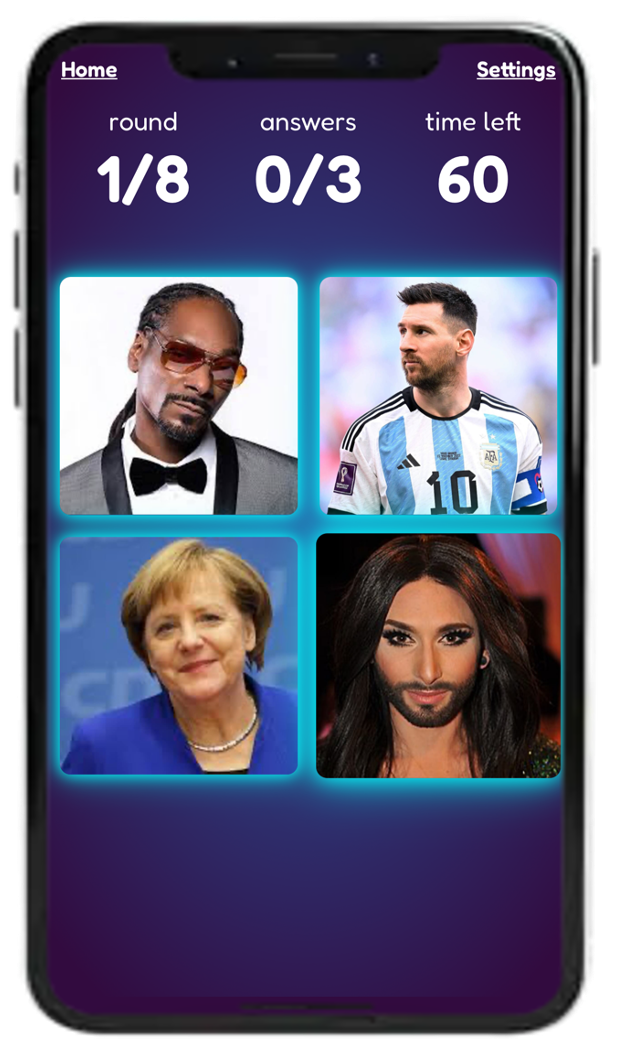
Private quizzes also support image-based clues, not just text — you can upload your own photos and use them as the clue instead, with players matching each picture to the correct song.
This works well for anything visual: a photo tied to a memory, a picture of a person or place, a screenshot, anything that means something specific to the people playing. It's a genuinely different feel from a text clue, and a good way to mix things up within a longer private quiz.
Who Can Actually See Your Photos
Photos you upload to a private quiz are stored under your account and aren't public — they're not listed in the quiz library, not visible to other Quiztopher users browsing quizzes, and not searchable or shared anywhere.
They're visible to you whenever you're creating or editing the quiz, and to the players in a specific game you host using that quiz — since obviously everyone playing a picture round needs to actually see the pictures. Outside of a game you're running, nobody else can access them.
Creating One
Private quiz creation is a premium feature, available from your profile page under "My Private Quizzes." From there you can start a new quiz, add clues one at a time (text or image), and it's saved to your account automatically as you go — ready to select the next time you start a game.
FAQ
Is creating a private quiz free?
Private quiz creation is a premium feature — free accounts can play any public quiz in the library, but building and saving your own custom quiz requires a premium account.
Can I use photos instead of text clues?
Yes, you can upload your own images and use them as clues instead of (or alongside) text clues, with players matching each photo to a song.
Are my private quiz photos visible to other Quiztopher users?
No — they're stored under your account, not listed in the public quiz library, and only visible to you and to players in a game you're actually hosting with that quiz.
Can other people find or play my private quiz without me?
No, a private quiz only appears under your own account and only gets played when you start a game and choose it — it isn't discoverable or listed for anyone else.
Can I edit a private quiz after creating it?
Yes, you can add, remove, or edit clues at any time before starting a game with it.
How many clues does a private quiz need?
It's flexible — you can build a short round for a specific occasion or a full-length quiz, depending on how many clues you write.
Ready to build your own quiz?
Write your own clues, add your own photos, and keep it visible only to you and whoever you invite to play.
Go Premium